

VR Workspace Costs: A 2026 Snapshot
Virtual reality is moving beyond gaming and entertainment, finding a solid foothold in remote work. The benefits are becoming clearer – increased engagement, a stronger sense of presence, and more immersive collaboration. But adopting VR for your remote team isn’t free. There's a spectrum of costs to consider, from the headsets themselves to the software that powers these virtual spaces and the IT infrastructure needed to support it all.
Estimating these costs in 2026 requires some speculation, as the technology is still evolving quickly. However, we can build a reasonable picture based on current trends and announced developments. This analysis will break down the major components of a VR workspace implementation, providing a realistic overview for businesses considering this technology. It’s important to remember these are projections, and actual pricing could vary.
The initial investment can seem daunting, but the potential return on investment – through increased productivity, reduced travel costs, and improved employee satisfaction – is a compelling argument for many organizations. This isn’t simply about buying gadgets; it's about building a new way to work.
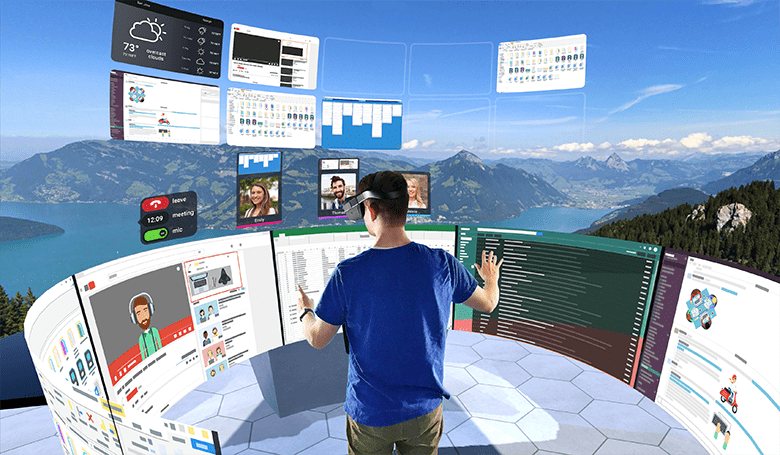
Headset Hardware: Price Ranges in 2026
VR headset prices in 2026 will likely span a wide range, mirroring the current market. Entry-level headsets, suitable for basic meetings and less demanding applications, are projected to start around $400-$600. These will likely offer decent visuals and tracking, but may compromise on features like resolution or field of view. The Meta Quest 3, or its successor, will probably anchor this segment.
Mid-range headsets, targeting more immersive experiences and demanding professional use cases, are expected to fall in the $800-$1500 range. We may see new entrants challenging Meta in this space, potentially from companies like HTC or Valve, with models boasting higher refresh rates, improved optics, and more precise tracking. These headsets will cater to teams needing a balance between performance and cost.
High-end headsets, aimed at specialized applications like design, engineering, and scientific visualization, could easily exceed $1500, potentially reaching $2000 or more. These will focus on delivering the highest possible fidelity, with features like eye-tracking, advanced haptics, and ultra-high-resolution displays. Varjo is a key player here, and I expect them to continue pushing the boundaries of VR hardware.
It is worth noting that display resolution, refresh rate, and tracking accuracy will be the primary differentiators between price points. A higher refresh rate reduces motion sickness, while better tracking improves the sense of presence. Consider your team’s specific needs and tolerance for these factors when making a purchasing decision.
- Entry-Level ($400-$600): Meta Quest 3 (or successor), suitable for basic VR meetings.
- Mid-Range ($800-$1500): Potential HTC or Valve models, offering a balance of performance and cost.
- High-End ($1500+): Varjo headsets, designed for professional applications requiring the highest fidelity.
Anticipated VR Headset Comparison - 2026
| Model | Resolution (per eye) | Refresh Rate (Hz) | Tracking Type | Target User | Estimated Price (USD) |
|---|---|---|---|---|---|
| Meta Quest 4 Pro | 2880 x 2880 | 120 | Inside-out, Hand Tracking | Collaborative Work, Training | $800 - $1200 |
| HTC Vive XR Elite (Successor) | 3200 x 3200 | 90-120 (variable) | Inside-out, Base Station Optional | Professional Design, Engineering | $1000 - $1500 |
| Valve Index 2 | 2880 x 1600 | 144 | Base Station, Finger Tracking | Immersive Simulations, Advanced Applications | $1200 - $1800 |
| Varjo Aero 2 | 3840 x 3744 | 90 | Inside-out & External Tracking | Professional Visualization, Medical Training | $2000 - $3000 |
| Pico 5 Pro (Successor) | 2560 x 2560 | 120 | Inside-out | Collaborative Work, Virtual Events | $600 - $900 |
| HP Reverb G3 Pro | 2880 x 2880 | 90 | Inside-out, Optional Base Stations | Productivity, Remote Assistance | $700 - $1100 |
Illustrative comparison based on the article research brief. Verify current pricing, limits, and product details in the official docs before relying on it.
Software & Platform Fees
The software landscape for VR workspaces is still developing. Currently, Meta Horizon Workrooms is a significant player, and importantly, it remains free to use. This is a major draw for organizations hesitant to invest in additional software costs. However, relying solely on a free platform can come with limitations in terms of customization and control.
I anticipate a rise in enterprise-focused VR platforms with subscription models. These platforms will likely offer advanced features like enhanced security, detailed analytics, and robust administrative controls. Per-user monthly fees could range from $20 to $100, depending on the features and support included. Companies like Spatial and Glue are already offering these kinds of services and will likely evolve.
Customization is another potential cost driver. If you require a highly tailored VR workspace, you may need to pay for custom development or integration services. This could involve modifying existing platforms or building a custom application from scratch. The cost of customization will vary widely depending on the complexity of the project.
Beyond the platform itself, consider the cost of any necessary integrations with existing tools like Slack, Microsoft Teams, or project management software. Seamless integration is crucial for maximizing productivity, and some integrations may require additional fees or development effort.
- Meta Horizon Workrooms: Currently free, but with potential limitations.
- Enterprise Platforms (Spatial, Glue): $20-$100 per user per month, offering advanced features.
- Custom Development: Variable cost, depending on complexity.
Essential Accessories: Beyond the Headset
A VR headset is just the starting point. A comfortable and functional setup requires a range of accessories. Controllers are essential for interacting with the virtual environment, and a good pair will cost around $100-$200. High-quality headphones, either integrated with the headset or separate, are crucial for immersive audio and clear communication – budget $50-$300 for a decent pair.
For setups requiring precise tracking, external tracking sensors may be necessary, adding another $100-$500 to the cost. While many headsets now offer inside-out tracking (eliminating the need for external sensors), the accuracy can sometimes be limited. Comfortable seating is often overlooked, but vital for long-term use. Invest in ergonomic chairs designed for extended VR sessions – expect to spend $200-$800 per chair.
More advanced accessories, like haptic suits or gloves, can significantly enhance the immersive experience, but come with a hefty price tag. These can range from $500 to several thousand dollars per unit. While not essential for most use cases, they can be valuable for training simulations or design reviews.
IT Infrastructure & Support Costs
Supporting a VR-enabled remote team requires a robust IT infrastructure. Network bandwidth is a critical consideration. VR applications are data-intensive, and a stable, high-speed internet connection is essential. Upgrading your network infrastructure could cost anywhere from $500 to $5000 or more, depending on your existing setup.
The computer powering the VR headset also needs to meet specific requirements. Minimum specs will vary depending on the headset and applications used, but generally, a powerful processor, dedicated graphics card, and sufficient RAM are essential. You may need to upgrade existing computers or invest in new hardware, costing $1000-$3000 per workstation.
IT support is another ongoing cost. Troubleshooting technical issues, managing software updates, and ensuring security are all essential tasks. You may need to train existing IT staff or hire dedicated VR support personnel. Security is paramount, and you'll need to implement measures to protect sensitive data within the virtual environment.
Don’t underestimate the importance of a reliable Wi-Fi network. A wired connection is always preferable for VR, but if that’s not feasible, invest in a high-performance Wi-Fi router and ensure strong signal coverage throughout the workspace.
Development & Customization Expenses
If your organization requires a custom VR workspace or application, development costs can be substantial. Hiring experienced VR developers can be expensive, with salaries ranging from $80,000 to $150,000 per year. The cost will depend on their skill set and location.
VR development platforms like Unity and Unreal Engine are powerful tools, but require specialized expertise. Licensing fees for these platforms can vary depending on the usage and revenue generated. Custom asset creation – 3D models, textures, and interactive elements – will also add to the cost. This can range from a few hundred dollars for simple assets to tens of thousands for complex environments.
I'm not sure about the exact costs, but it’s reasonable to estimate that a basic custom VR application could cost $20,000 to $50,000 to develop. More complex applications could easily exceed $100,000. It’s crucial to clearly define your requirements and create a detailed project plan before embarking on a custom development project.
Long-Term Maintenance & Upgrades
VR technology changes rapidly. Unlike traditional hardware, headsets don’t necessarily last for years. Expect to replace headsets every 2-3 years to stay current with the latest advancements. Repairs can also be costly, especially for high-end models. Budget for ongoing maintenance and potential replacements.
Software updates are essential for security and performance. However, updates can sometimes introduce compatibility issues or require additional training. Staying current with the latest software versions is an ongoing effort. The VR ecosystem is still evolving, and new standards and protocols are constantly emerging.
Consider the cost of ongoing training for your team. As new features and applications become available, employees will need to learn how to use them effectively. Investing in training ensures that your team can maximize the benefits of VR technology. It’s easy to overlook these ongoing costs, but they can add up over time.
Don’t forget about the cost of data storage and backup. VR applications can generate large amounts of data, and you’ll need a reliable system for storing and protecting this information.
- Headset Replacement: Every 2-3 years.
- Software Updates: Ongoing maintenance and potential compatibility issues.
- Employee Training: Keeping skills current with new features.
- Data Storage & Backup: Managing large VR data sets.
Total Cost of Ownership: Scenarios
Let's look at some realistic cost scenarios over a 3-year period. For a small startup (5 employees) using entry-level headsets and free software, the TCO could be around $15,000-$25,000, primarily covering headset replacements and IT support.
A medium-sized business (50 employees) opting for mid-range headsets and a paid platform could see a TCO of $80,000-$150,000. This includes headset costs, software subscriptions, IT infrastructure upgrades, and ongoing support.
A large enterprise (200 employees) with high-end headsets, custom development, and dedicated support could face a TCO exceeding $300,000 over three years. This is a significant investment, but it can be justified by the potential for increased productivity and innovation.

No comments yet. Be the first to share your thoughts!