

AI home automation costs in 2026
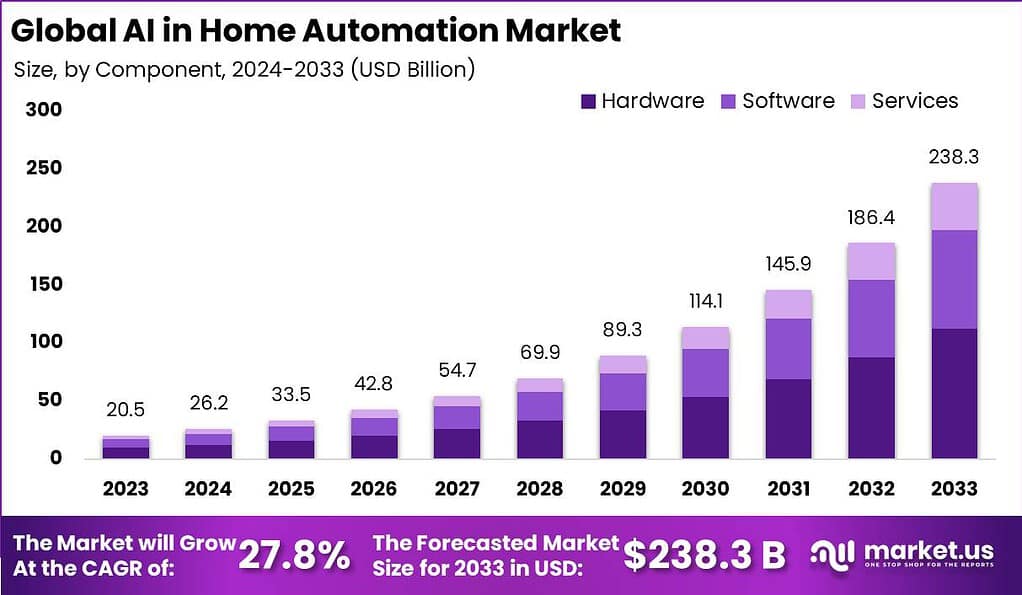
By 2026, AI home automation is less about remote control and more about systems that learn your schedule. We're seeing setups that adjust thermostats before you feel a chill or dim lights based on the time of day without being asked. You can start with a single voice assistant or wire an entire house to manage security and climate automatically.
The level of automation directly impacts cost. A basic system, focused on a few key areas like lighting and a smart thermostat, might start around $500. Intermediate systems, adding security features and more extensive control, can easily climb into the $1500-$3000 range. For truly advanced setups – encompassing whole-home automation with custom scenes, AI-driven energy management, and professional monitoring – you’re looking at $5000 and up.
Prices vary by square footage and the age of your home. A one-bedroom apartment is cheaper to outfit than a three-story house, especially if an older home needs a panel upgrade to handle new smart switches. I recommend mapping out which rooms actually need automation before buying hardware.
Hubs and wireless protocols
A central hub connects your devices. In 2026, the SmartThings Hub ($150-$250) and Hubitat Elevation ($130-$200) are the standard for local processing. If you use an iPhone, the HomePod ($299) is the obvious choice, though it still struggles to talk to third-party hardware that isn't HomeKit compatible.
Choosing the right wireless protocol is equally important. Wi-Fi is the most convenient, as most devices already support it, but it can become congested with too many devices. Zigbee and Z-Wave offer more reliable mesh networks, but they require a compatible hub. The emergence of Matter, a new universal standard, aims to simplify interoperability, but its full adoption in 2026 is still uncertain. Expect hubs supporting Matter to add around $50-$100 to the initial cost.
Voice assistants are the primary interface for many smart home users. Amazon Echo devices (Dot: $50, Show: $150-$250) and Google Home devices (Nest Mini: $50, Hub: $100-$200) will continue to dominate the market. These devices not only provide voice control but also act as hubs for certain protocols. The cost of these assistants should be factored into your overall budget.
Security systems and AI protection
Smart security systems are a major driver of AI home automation adoption. A basic system including a smart doorbell (Ring: $100-$300, Nest: $200-$350), one or two security cameras ($80-$250 each), and a few window/door sensors ($20-$50 per sensor) can cost between $300 and $800. Professional installation can add another $200-$500.
AI features are increasingly common in security systems. Facial recognition, package detection, and intelligent alerts that distinguish between people, pets, and vehicles are becoming standard offerings, often bundled into subscription plans. These plans typically range from $10 to $30 per month. The cost of professional monitoring services, offering 24/7 response to alarms, adds another $20-$60 per month.
DIY systems, like those offered by SimpliSafe, are a more affordable option, but they require self-installation and may not offer the same level of integration or professional support. Homeowner’s insurance companies often offer discounts – around 5-10% – for homes equipped with professionally monitored smart security systems, which can offset some of the ongoing costs.
- Smart doorbell: $100 - $350
- Security Camera (Indoor/Outdoor): $80 - $250 each
- Motion Sensor: $30 - $60
- Window/Door Sensor: $20 - $50 each
- Professional Monitoring (Monthly): $20 - $60
DIY vs. Professionally Installed Smart Security Systems - Cost & Features (2026)
| Installation Cost | Monthly Fees | Contract Length | System Customization | Response Time | Reliability |
|---|---|---|---|---|---|
| Low | Low to Medium | None | High | Medium | Medium |
| Medium to High | Medium to High | Often Required | Medium | High | High |
Illustrative comparison based on the article research brief. Verify current pricing, limits, and product details in the official docs before relying on it.
Comfort & Convenience: Climate, Lighting, and Entertainment
Automating comfort and convenience features can significantly enhance your quality of life. Smart thermostats like the Nest Learning Thermostat ($200-$250) and Ecobee SmartThermostat ($250-$300) can learn your heating and cooling preferences, optimizing energy usage and potentially saving you money on your utility bills. Smart lighting systems, such as Philips Hue ($20-$50 per bulb) and LIFX ($40-$60 per bulb), offer customizable lighting scenes and voice control.
Smart blinds and shades (starting around $150 per window) can automatically adjust to sunlight, reducing glare and saving energy. Whole-home entertainment systems, integrating smart TVs, sound systems, and streaming devices, can cost anywhere from $500 to several thousand dollars, depending on the complexity and quality of the components. Integrating these systems with voice assistants allows for hands-free control.
Robotic vacuums (Roomba: $200-$1000, Roborock: $300-$1500) offer automated floor cleaning, while smart appliances – refrigerators, ovens, washing machines – provide remote monitoring and control. While these appliances are convenient, they also represent a significant upfront investment. Expect to pay a premium for smart appliance functionality.
Installation Costs: Labor and Complexity
Installation costs are a major, often underestimated, component of AI home automation. A simple DIY setup, involving a few plug-and-play devices, might not require any professional help. However, a whole-home automation project, particularly in older homes, will likely necessitate the services of qualified professionals.
Electricians typically charge between $75 and $150 per hour for wiring and installation work. Network engineers, needed for setting up complex network infrastructure, can charge $100 to $200 per hour. The complexity of the project significantly impacts labor costs. Running new wiring, installing smart switches, and integrating different systems all add to the total cost.
Homes with outdated electrical systems may require upgrades to support the increased power demands of smart devices. This can add several hundred to several thousand dollars to the installation cost. It's crucial to obtain multiple quotes from qualified professionals before committing to a project.
- Electrician: $75 - $150 per hour
- Network Engineer (Hourly): $100 - $200
Ongoing Costs: Subscriptions and Maintenance
The costs don’t stop after installation. Many smart home systems rely on subscription services for features like security monitoring, cloud storage, and advanced AI capabilities. These subscriptions typically range from $5 to $30 per month, depending on the provider and the features included. It's important to factor these recurring expenses into your long-term budget.
Smart home devices also require maintenance. Batteries need to be replaced periodically, software updates need to be installed, and, inevitably, devices will occasionally malfunction and require repair or replacement. Cybersecurity is a growing concern, and investing in robust security measures, such as a strong Wi-Fi password and regular software updates, is essential.
The lifespan of smart home devices varies, but most devices are expected to last between 5 and 10 years. As technology advances, you may need to replace older devices to maintain compatibility and access the latest features. Budgeting for these replacements is crucial for long-term cost management.
Estimated budget tiers
To provide a clearer picture, here’s a breakdown of estimated costs for three tiers of smart home systems in 2026. Keep in mind that these are just estimates, and actual costs will vary based on your specific needs and circumstances.
Basic ($500-$1500): Includes a smart hub, a few smart lights, a smart thermostat, and potentially a smart speaker. Focuses on convenience and energy savings. Minimal professional installation required.
Intermediate ($1500-$5000): Adds a smart security system with door/window sensors, a smart doorbell, and potentially a security camera. Includes professional monitoring and integration with voice assistants. May require some professional installation.
Advanced ($5000+): Encompasses whole-home automation, including advanced security features, automated lighting and climate control, whole-home entertainment, and potentially smart appliances. Requires significant professional installation and ongoing maintenance. Offers the highest level of convenience, security, and energy efficiency.

No comments yet. Be the first to share your thoughts!