

AI Home Automation Costs: 2026 Snapshot
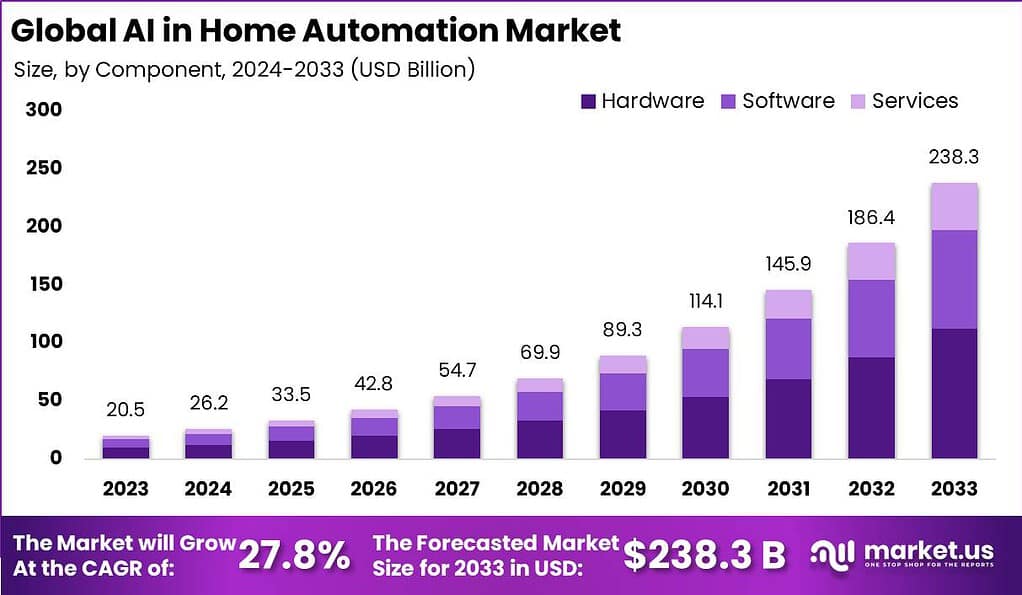
AI home automation is becoming common. It goes beyond voice assistants to systems that learn your habits for better energy use, security, and daily life. Adoption is growing as the technology improves and becomes more affordable, driven by a need for energy efficiency, better security, and the convenience of a connected home.
The cost to start is a big factor for many. A smart home is a collection of devices, not one purchase. Costs range from a few hundred dollars for basic setups to tens of thousands for fully integrated systems. The level of AI integration directly affects the price; advanced features like facial recognition and predictive maintenance cost more.
Costs depend on your home's size, the number of devices, and whether you hire a professional. This guide breaks down the key components and costs for 2026 to help you estimate building an AI smart home. Many variables exist, offering customization for your budget and needs.
Core System Costs: The Building Blocks
A central hub is the core of any AI home automation system. Hubs like SmartThings ($99 - $199), Hubitat Elevation ($149 - $249), or Apple HomeKit (integrated into Apple TV or HomePod, $99 - $299) connect and control your smart devices. Your hub choice often determines the wireless protocols you use: Zigbee, Z-Wave, Wi-Fi, and Matter.
The protocol affects cost and compatibility. Zigbee and Z-Wave are mesh networks with good range and reliability, but need a compatible hub. Wi-Fi is common but can be congested and less secure. Matter aims for cross-platform compatibility, but adoption is ongoing and device options are limited. A good Zigbee or Z-Wave smart plug costs $30-$70.
Voice assistants like Amazon Echo ($49+) and Google Home ($49+) offer voice control. They aren't essential but add convenience. Some hubs need professional installation for complex setups, adding $100-$300, according to Angi. A reliable router is also essential for a strong home network.
Beyond the hub and voice assistant, factor in ongoing costs for software updates and cloud storage. Many hubs offer local control, but some features need cloud connectivity, possibly requiring a subscription. Angi reports the average cost for a smart home hub and setup is $200-$800, depending on features and installation.
Security Systems: AI-Powered Protection
AI greatly improves home security. Smart locks ($150-$300) offer keyless and remote access. Security cameras ($80-$300) provide live video and motion detection. Video doorbells ($150-$250) let you see and speak to visitors remotely. AI features include facial recognition to identify people and anomaly detection for unusual activity.
Professional monitoring ($20-$60/month) alerts authorities during emergencies. DIY systems are cheaper initially but require self-monitoring. Costs depend on the number of sensors, cameras, and monitoring level. A comprehensive DIY system costs $500-$1500, while a professionally installed and monitored system is $1000-$3000+.
The average smart home security system cost in 2026 is $700-$2,500, including installation, according to HomeGuide. Professional installation adds $100-$500. A monitored system may also save on homeowner's insurance.
AI-powered systems can significantly reduce false alarms caused by pets or weather, which often lead to fines and wasted police resources. These systems analyze video and audio to better distinguish real threats.
- Smart Lock: $150 - $300
- Security Camera: $80 - $300
- Video Doorbell: $150 - $250
- Professional Monitoring: $20 - $60/month
AI-Powered Home Security System Feature Comparison (2026)
| Security Provider | Facial Recognition | Package Detection | Two-Way Audio | Professional Monitoring |
|---|---|---|---|---|
| Ring | Available on select devices with subscription | Available with Video Doorbell Pro 2 and subscription | Standard on most video devices | Optional subscription service |
| SimpliSafe | Not natively available, potential integrations with third-party systems | Limited functionality through camera views | Available with SimpliSafe cameras | Multiple monitoring plans available |
| ADT | Integrated with select camera options and control panels | Available with select outdoor cameras | Standard with many ADT cameras and control panels | Required with most plans; various tiers available |
| Cove | Available with select camera options | Available with select outdoor cameras | Available with Cove cameras | Required with all plans |
| Vivint | Integrated with select camera options | Available with select outdoor cameras | Integrated with most cameras and control panels | Required with all plans; professional installation recommended |
| Abode | Available with select camera options and subscription | Available with select cameras and subscription | Available with Abode cameras | Optional self or professional monitoring |
Illustrative comparison based on the article research brief. Verify current pricing, limits, and product details in the official docs before relying on it.
Comfort & Convenience: Lighting, Climate, and More
Automating comfort and convenience can improve life and lower energy bills. Smart thermostats ($150-$300) learn your preferences to adjust temperature. Smart lighting systems ($50-$200 per starter kit) allow remote control, scheduling, and color changes.
Smart blinds and shades ($100-$500 per window) automate coverings for privacy and energy savings. Smart appliances ($500-$3000+) offer remote control and energy monitoring. Smart thermostats can reduce heating and cooling costs by 10-12%.
Costs vary by the number of rooms automated. A whole-house smart lighting system can cost $500-$2000+. Smart thermostats may need professional installation if you lack C-wire connections, adding $75-$200. Some appliances also require professional installation for electrical or plumbing needs.
Automating a single bedroom with a smart thermostat and lights might cost $200-$400. A kitchen with smart appliances and lighting could exceed $2000. The initial investment is often offset by long-term energy savings.
Entertainment: Whole-Home Audio & Video
AI integration in home entertainment improves viewing and listening. Smart TVs ($500-$3000+) offer voice control and streaming. Smart speakers ($100-$500) provide quality audio and voice assistant integration. Whole-home audio systems ($1000-$5000+) stream music throughout your house.
Universal remotes ($150-$350) simplify controlling multiple devices. Voice control and automation allow you to change channels, adjust volume, and manage your entertainment
The cost of integrating AI into your entertainment system depends on the number of devices and the complexity of the setup. A basic smart TV and smart speaker setup might cost $600-$1000. A whole-home audio system with multiple speakers and a dedicated amplifier could easily exceed $5000. Installation costs can also add up, particularly for complex setups requiring wiring and configuration.
While specific AI features within entertainment are still evolving, the underlying hardware and installation costs are fairly well-defined. Focusing on these core components provides a realistic estimate of the investment required.
Installation Costs: DIY vs. Professional
The decision to install your AI home automation system yourself or hire a professional is a significant one. DIY installation can save you money, but it requires technical skills and a willingness to troubleshoot problems. Professional installation ensures a seamless setup, but it comes at a higher cost. According to Angi, the average cost of professional smart home installation ranges from $100 to $500 per hour, depending on the complexity of the project and your location.
Simple tasks like installing smart bulbs or setting up a smart speaker are relatively straightforward and can be easily handled by most homeowners. However, more complex installations, such as wiring a smart thermostat or installing a security system, may require a qualified electrician or technician. The labor costs for different types of installations vary considerably.
DIY projects require a significant time commitment. Installing a basic smart home system might take a weekend, while a more complex system could take several weeks. It's important to be realistic about your skills and available time. Professional installation typically takes a few hours to a few days, depending on the scope of the project. The benefits of professional installation include proper configuration, troubleshooting support, and a warranty on the work.
It’s important to be honest about the skills required for DIY installation. Some tasks, like working with electrical wiring, should only be performed by qualified professionals. Attempting a DIY installation beyond your capabilities could result in damage to your home or injury.
- Simple tasks (smart bulbs): 1-2 hours
- Complex tasks (security system): Several weeks
- Professional installation: A few hours to a few days
Hidden Costs & Ongoing Expenses
Don't forget to factor in the hidden costs and ongoing expenses associated with AI home automation. Subscription fees for cloud storage, professional monitoring, and software updates can add up quickly. Many security systems require a monthly subscription to access features like video recording and remote access. Cloud storage for security camera footage typically costs $10-$30 per month.
The cost of replacing batteries for sensors and devices is another often-overlooked expense. Many smart sensors rely on batteries, which need to be replaced every few months or years. Troubleshooting and repairs can also be costly. If a device malfunctions, you may need to pay for a technician to diagnose and fix the problem.
It's important to be upfront about these ongoing expenses. A seemingly affordable smart home system can quickly become expensive when you factor in the monthly subscription fees and maintenance costs. Budget accordingly to avoid surprises. Consider the total cost of ownership over the lifespan of the system, not just the initial purchase price.
Regular software updates are crucial for maintaining security and ensuring compatibility. However, some updates may require a subscription or additional fees. Be sure to read the fine print before purchasing any smart home device.

No comments yet. Be the first to share your thoughts!